
Simple freight management for Windows and Linux.
Keeps your transport records tidy in a no-frills desktop package
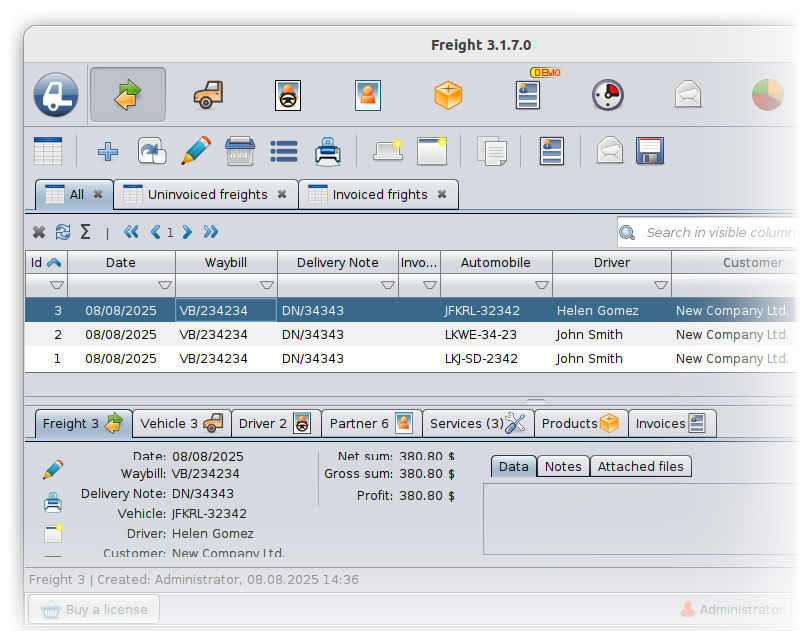
Freight management software with invoicing. Simply enter each load, vehicle and driver by hand, then let the software spin out invoices, deadline reminders and XLS/PDF exports—giving small fleets the order and oversight of an enterprise system without the enterprise price.
Features
Jobcard 3 integrates a range of useful features into a single application.

Invoice Module
Invoices can be easily created for job cards.

AI Assistant
Integrated GPT functions help to generate text and answer questions.

Easy Searching
Rich filtering and searching capabilities.

Stock control
Simple integrated stock management.

Customizable
Expandable data fields, customizable printouts.

Exportable
All data tables can be exported to several formats.
Find the ideal license for you
Solo
$9
per month (billed annually)
For single workstation.
Standard
$15
per month (billed annually)
For 3 workstations.
Pro
$24
per month (billed annually)
For 5 workstations.
Custom
Do you need license for more workstations? We have a special offer for you.
Licenses include
- Job management
- Customer register
- Stock management
- AI Assistant
- E-mail sending
- Invoice module
- Statistics module
- Deadline module
- Custom logo on printouts
- Customer service
Download and try Freight 3 for free
For all 64 bit Windows versions.
Our installers are safe and digitally signed, however, it is possible that your browser and Windows may display security warnings. If you download the installer from our website, you can ignore these warnings.
For 64 bit Linux systems (tested on Ubuntu). Requires user-level Linux knowledge.
After downloading, you need to set the execution rights for the installation file. Right-click on the file, then select the Settings menu, and there allow the file to be executed.
The installer need to be executed from the terminal as root. (With sudo.)
Reviews
About Freight 3
Freight 3 is a no‑frills freight management app for Windows and Linux that keeps loads, vehicles, drivers, and invoices organized in one place. Designed for small fleets, it replaces scattered spreadsheets with clear workflows, deadline reminders, and exportable reports—without the enterprise price tag.
What Freight 3 does for you
- Load management: Capture every consignment’s pickup/drop‑off, dates, rates, distance, notes, and status in a searchable record.
- Vehicles and drivers: Maintain vehicle and driver registers, documents, and availability, and link them to loads.
- Integrated invoicing: Turn completed loads into professional invoices in seconds, with your logo, taxes, and itemized lines.
- Reminders and deadlines: Track expiries (licenses, inspections), delivery deadlines, and follow‑ups so nothing slips through.
- Customer management: Store contacts, terms, and history for faster repeat bookings and better communication.
- Stock/parts tracking: Keep simple records of consumables or parts related to your operations.
- Powerful search and filters: Find loads, customers, vehicles, and drivers instantly.
- Flexible customization: Add custom columns, tailor printouts, and adapt tables to your workflow.
- Customizable printouts: Add your branding and tailor load sheets, invoices, and reports.
- Data export: Export any table to XLS, CSV, PDF, or TXT for sharing or analysis.
- File attachments: Attach PODs, waybills, permits, and other documents to records.
- Network‑ready: Use built‑in server mode so multiple workstations share one database.
- Built‑in AI assistant: Integrated GPT features help draft emails, notes, and documents.
Why small fleets choose Freight 3
- Simple and focused: Clear, time‑saving workflows from booking to billing.
- Saves time and reduces errors: Fewer mistakes with everything linked in one system.
- Professional image: Professional documents that build trust with clients.
- Team work: Scales from a single PC to several workstations easily.
System requirements
Operation system
- Windows 11 (64 bit)
- Windows 10 (64 bit)
- Windows 8 (64 bit)
- Windows 7 (64 bit)
- Windows Xp (64 bit)
- Linux (64 bit)
Screen resolution
Minimum 1024 x 768
Free storage space
1 GByte + database size
Free memory
1 GByte
Power requirement
- Standalone mode: 2 GHz CPU
- Server mode: 2 x 2 GHz CPU
(multiple workstations)
Network
- Minimal bandwidth: 1 MBit/s
- TCP/IP connection is needed between the server and the client machine