
For Windows and Linux desktop.
Effortless Inventory Tracking for Small Businesses
Simple and free inventory management software for small businesses, with built-in invoicing, email templates, customer management, and deadline reminders.
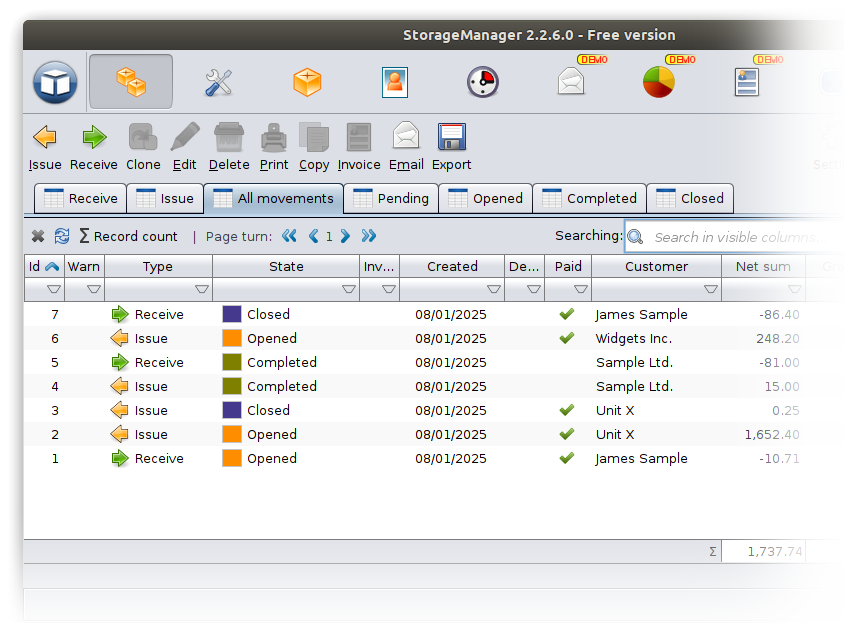
Features
InventoryManager 2 integrates a range of useful features into a single application.

Invoice Module
Invoices can be easily created for job cards.

AI Assistant
Integrated GPT functions help to generate text and answer questions.

Easy Searching
Rich filtering and searching capabilities.

Stock control
Simple integrated inventory management.

Customizable
Expandable data fields, customizable printouts.

Exportable
All data tables can be exported to several formats.
Find the ideal license for you
Free
$0
Basic features for startups and personal users.
Includes
- Customer register
- Inventory management
- AI Assistant
- Deadline reminder
Standard
$4
per month (billed annually)
Comprehensive feature set
for small teams.
Includes
- Customer register
- Inventory management
- AI Assistant
- E-mail sending
- Invoice module
- Statistics module
- Deadline module
- Custom logo on printouts
- Customer service
Custom
Custom offer for more.
Download InventoryManager 2 for free
For all 64 bit Windows versions.
Our installers are safe and digitally signed, however, it is possible that your browser and Windows may display security warnings. If you download the installer from our website, you can ignore these warnings.
For 64 bit Linux systems (tested on Ubuntu). Requires user-level Linux knowledge.
After downloading, you need to set the execution rights for the installation file. Right-click on the file, then select the Settings menu, and there allow the file to be executed.
The installer need to be executed from the terminal as root. (With sudo.)
About InventoryManager 2
InventoryManager 2 is a simple, free inventory and invoicing solution for small businesses on Windows and Linux. It brings your stock, customers, and documents into one easy workspace—so you can track items, bill accurately, and stay on top of deadlines without complexity.
What you can do with InventoryManager 2
- Stock control made easy: Add products, adjust quantities, track movements in and out, and see current levels at a glance.
- Manage customers: Keep a clean customer database with history for faster repeat sales and better service.
- Fast invoicing: Create professional invoices directly from stock movements or orders in a few clicks.
- Email communication: Use built‑in email sending with simple templates to keep clients informed.
- Reminders and deadlines: Set due dates and follow-ups for orders so nothing slips through the cracks.
- Search and filter: Find items, movements, and customers instantly with rich filtering and fast tables
- Customizable printouts: Add your logo and tailor printouts and fields to match your workflow.
- Barcode friendly: Generate and print barcodes to streamline picking and labeling.
- File attachments: Attach photos, PDFs, and other documents to records for complete traceability.
- Data export: Export tables to XLS, CSV, PDF, or TXT for reporting or sharing.
- AI assistant: Integrated GPT tools help draft messages, notes, and other texts faster.
Why workshops choose InventoryManager 2
- Straightforward, time‑saving workflows: InventoryManager 2 streamlines everyday tasks—like adding stock, recording movements, and billing—so you get work done faster with fewer clicks.
- Professional invoices and communication: Generate clean, branded invoices and send clear customer emails directly from the app to present a polished, consistent image.
- Flexible customization without bloat: Adapt fields, printouts, and tables to your workflow without wading through unnecessary features or complex setup.
- Start free, upgrade anytime: Use the free version to get working immediately; move to a paid plan later for advanced features like statistics and extended modules.
System requirements
Operation system
- Windows 11 (64 bit)
- Windows 10 (64 bit)
- Windows 8 (64 bit)
- Windows 7 (64 bit)
- Windows Xp (64 bit)
- Linux (64 bit)
Screen resolution
Minimum 1024 x 768
Free storage space
1 GByte + database size
Free memory
1 GByte
Power requirement
2 GHz CPU