
Unit Settings
The Units settings section allows you to manage the list of available tax rates and measurement units used throughout the application. These lists are used when creating items, services, invoices, and other records.
Proper configuration ensures consistent data entry and correct calculations.
Accessing Units Settings
To view or change these settings:
- Open the Main Menu
- Go to Settings
- Select Units
This opens the Units settings window, where you can customize your tax rate and unit lists.
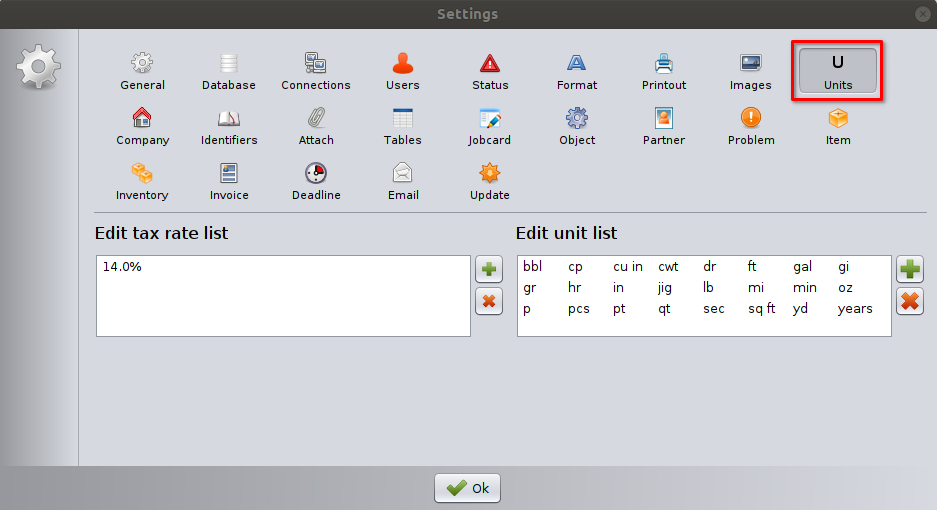
Edit Tax Rate List
This section contains the list of tax (VAT) rates available in the system.
Tax rate list
- Displays all tax rates that can be selected in invoices, items, and services.
- Each rate is defined as a percentage (for example: 14.0%).
Adding a tax rate
- Click the Add new (+) button.
- Enter the new tax rate as a percentage.
- The new rate becomes immediately available for selection.
Removing a tax rate
- Select the tax rate from the list.
- Click the Delete (×) button to delete it.
⚠️ Important: Removing a tax rate does not change existing documents that already use it, but it will no longer be available for new records.
Edit Unit List
This section defines the measurement units available in the application.
Unit list
- Displays all predefined units (e.g.
pcs,kg,hr,m,ft,sq ft,years, etc.). - Units can be used for:
- Items
- Services
- Inventory records
- Invoices and job cards
Adding a unit
- Click the Add new (+) button.
- Enter the unit abbreviation (for example:
box,set,km). - The unit becomes available immediately.
Removing a unit
- Select a unit from the list.
- Click the Delete (×) button to delete it.
⚠️ Important: Units already used in existing records remain unchanged, but the removed unit cannot be selected for new entries.
Saving Changes
Click OK to save all changes to tax rates and units.
Changes take effect immediately across the application.
Best Practices
- Define tax rates according to local tax regulations.
- Keep unit names short and clear to avoid confusion.
- Avoid removing tax rates or units that are still actively used.
- Review these lists before creating new items or invoices.
Notes
- These settings apply globally to all users.
- Only users with appropriate permissions should modify tax rates and units.
- Changes do not affect historical data.